Posted by admin on September 30, 2007 under Tech Tips | 
Turing on colored syntax highlighting in Vim can make it easier when looking through complicated text files, scripts, and source code. To quickly turn on or off the feature, use the “syntax” command within Vim:
:syntax on

:syntax off
The results are great. Here’s a screenshot of Vim in color.
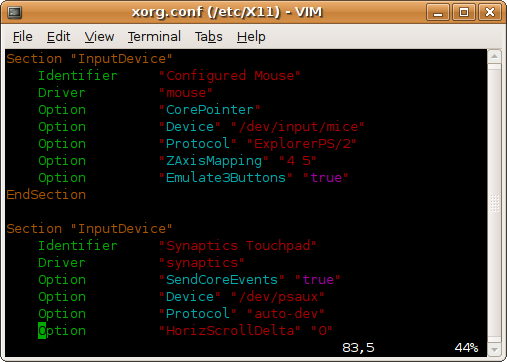
To make the feature permanent, edit the file /etc/vim/vimrc, or as your Vim package maintainer may suggest, /etc/vim/vimrc.local. One can also make the change simply for their user only by editing ~/.vimrc. In all cases, simply add the following line at the end of the file:
:syntax on
Users of Ubuntu by default have vim-tiny, which as it’s name suggests, is a smaller version of the Vim editor. This version does not support syntax highlighting and a number of other features. Of course, remedying this is very easy by installing the full featured vim:
# sudo apt-get install vim
Happy editing.
Posted by admin on September 2, 2007 under Tech Tips |

DenyHosts is a project that adds a protective layer to an SSH server by automatically blocking malicious hosts that use brute force or dictionary attacks. If you have SSH services enabled and accessible from the internet, you will likely have thousands of failed login attempts from several sources within a very short period of time. DenyHosts monitors all login attempts, and based on a customizable rule-set can block hosts from making further connections if an attack pattern is matched.
Using tcp_wrappers, the DenyHosts service elegantly manages entries in the /etc/hosts.deny file, adding and removing hosts when thresholds are crossed. e.g. Three failed logins with unknown user accounts; Three failed logins with root account; Five failed logins with known user accounts; Unblock host after a set period of time; etc. You can also specify whether DenyHosts blocks access to SSH or ALL services, thereby mitigating any other attack vectors the offender might try next.
A most valuable feature that makes DenyHosts even more attractive is the optional centralized reporting system. The service can be configured to report all abusive hosts to the DenyHosts collection server, and automatically import a list of IP addresses that others have reported. This network of intelligence gathering and incident response helps to thwart a large number of attacks before they happen, because the attackers (most of which are automated bots) are blocked before they have a chance to move on to other protected servers.Other useful features include email notification when hosts are blocked, and counter resets after successful authentication to prevent accidental blacklisting caused by fat fingered admins. 
For those of you using Ubuntu 7.04 (Feisty Fawn) and above, it is available in the Universe repository:
sudo apt-get install denyhosts
Edit and customize /etc/denyhosts.conf for your desired options, and restart the service:
sudo /etc/init.d/denyhosts restart
Ubuntu 6.06.1 LTS will need a manual installation, as it is not included in the repositories.
Be sure to check out the project at http://denyhosts.sourceforge.net.
Posted by admin on under Tech Tips |
If you would like to make it easier to visually spot what you are looking for when using “grep”, try out the “–color” flag. This option highlights any matches in the output of your search, giving you an upper hand when trying to visually scan through complicated or cumbersome sequences.
For example, if you were looking for any IP address in your /etc/hosts.deny file that has the number “209” in it, issue the following command:
grep --color 209 /etc/hosts.deny
Here is the comparison of the same output, with and without the color option.


As you can see, one might find it very easy to miss the fact that there are some IP addresses that have multiple octets with the value of 209. The color flag really comes in handy.
UPDATE (12/13/2009): In the most recent versions of Ubuntu, a local alias has been defined in the default .bashrc for each user. This alias gives turns on color highlighting with the following line.
alias grep='grep --color=auto'